spring 分布式集群跨域问题
主要是对于集群跨域访问的解决方案,近期的项目有用到过,所以加以巩固、学习和分享,也可以直观的了解跨域问题以及解决方案,跨域并不是只有JavaWeb才会发生的现象,只是在这里我通过Spring进行演示和学习。
什么是跨域
通俗的说,一台主机上提供的一个服务(端口)就是一个域,也就是说,一台主机可以有不同的域,每个域之间是相互隔离的,但是直接通过URL地址访问是可以直接访问的,因为直接访问是没有源的,当使用异步请求(jQuery的Ajax或Angular的$http)调用接口时,你的源就是发送请求的那个页面所对应的域,发送请求的域访问另一个端口的服务接口,那就是跨域。
实战
任务
- 创建一个服务端控制器,充当接口(5555)
- 创建两个客户端,分别访问服务端的接口(5556,5557)
实践
在这里我们创建的是Maven聚合工程,工程结构如下所示。
-train_domain
|-train_service
|-train_user
|-train_user2
:tipping_hand_woman:服务层和用户的pom文件、xml文件都是相同的配置,只是在tomcat插件的端口号变了而已嗷。就不赘述了。
定义pom
这里以train_service为例,user的只需要修改端口号
<?xml version="1.0" encoding="UTF-8"?>
<project xmlns="http://maven.apache.org/POM/4.0.0"
         xmlns:xsi="http://www.w3.org/2001/XMLSchema-instance"
         xsi:schemaLocation="http://maven.apache.org/POM/4.0.0 http://maven.apache.org/xsd/maven-4.0.0.xsd">
    <modelVersion>4.0.0</modelVersion>
    <groupId>org.example</groupId>
    <artifactId>train_service</artifactId>
    <version>1.0-SNAPSHOT</version>
    <packaging>war</packaging>
    <dependencies>
        <dependency>
            <groupId>javax.servlet</groupId>
            <artifactId>servlet-api</artifactId>
            <version>2.5</version>
            <scope>provided</scope>
        </dependency>
        <dependency>
            <groupId>org.springframework</groupId>
            <artifactId>spring-web</artifactId>
            <version>4.2.4.RELEASE</version>
        </dependency>
        <dependency>
            <groupId>com.alibaba</groupId>
            <artifactId>fastjson</artifactId>
            <version>1.2.75</version>
        </dependency>
        <dependency>
            <groupId>org.springframework</groupId>
            <artifactId>spring-webmvc</artifactId>
            <version>4.2.4.RELEASE</version>
        </dependency>
    </dependencies>
    <build>
        <plugins>
            <!-- 配置Tomcat插件 -->
            <plugin>
                <groupId>org.apache.tomcat.maven</groupId>
                <artifactId>tomcat7-maven-plugin</artifactId>
                <configuration>
                    <path>/</path>
                    <port>5555</port>
                    <uriEncoding>UTF-8</uriEncoding>
                </configuration>
            </plugin>
            <plugin>
                <groupId>org.apache.maven.plugins</groupId>
                <artifactId>maven-compiler-plugin</artifactId>
                <configuration>
                    <source>6</source>
                    <target>6</target>
                </configuration>
            </plugin>
        </plugins>
    </build>
</project>
配置Springmvc
<?xml version="1.0" encoding="UTF-8"?>
<beans xmlns="http://www.springframework.org/schema/beans"
       xmlns:xsi="http://www.w3.org/2001/XMLSchema-instance"
       xmlns:context="http://www.springframework.org/schema/context"
       xmlns:mvc="http://www.springframework.org/schema/mvc"
       xsi:schemaLocation="http://www.springframework.org/schema/mvc http://www.springframework.org/schema/mvc/spring-mvc.xsd
      http://www.springframework.org/schema/beans http://www.springframework.org/schema/beans/spring-beans.xsd
      http://www.springframework.org/schema/context http://www.springframework.org/schema/context/spring-context.xsd">
    <context:component-scan base-package="com.alc.test.controller"/>
    <mvc:annotation-driven>
        <mvc:message-converters register-defaults="true">
            <bean class="com.alibaba.fastjson.support.spring.FastJsonHttpMessageConverter">
                <property name="supportedMediaTypes" value="application/json"/>
                <property name="features">
                    <array>
                        <value>WriteMapNullValue</value>
                        <value>WriteDateUseDateFormat</value>
                    </array>
                </property>
            </bean>
        </mvc:message-converters>
    </mvc:annotation-driven>
</beans>
配置Web.xml
<?xml version="1.0" encoding="UTF-8"?>
<web-app xmlns:xsi="http://www.w3.org/2001/XMLSchema-instance" xmlns="http://java.sun.com/xml/ns/javaee" xsi:schemaLocation="http://java.sun.com/xml/ns/javaee http://java.sun.com/xml/ns/javaee/web-app_3_0.xsd" version="3.0">
    <servlet>
        <servlet-name>springmvc</servlet-name>
        <servlet-class>org.springframework.web.servlet.DispatcherServlet</servlet-class>
        <init-param>
            <param-name>contextConfigLocation</param-name>
            <param-value>classpath:spring/springmvc.xml</param-value>
        </init-param>
    </servlet>
    <servlet-mapping>
        <servlet-name>springmvc</servlet-name>
        <url-pattern>*.do</url-pattern>
    </servlet-mapping>
    <context-param>
        <param-name>contextConfigLocation</param-name>
        <param-value>classpath:spring/spring-*.xml</param-value>
    </context-param>
    <listener>
        <listener-class>org.springframework.web.context.ContextLoaderListener</listener-class>
    </listener>
    <filter>
        <filter-name>characterEncodingFilter</filter-name>
        <filter-class>org.springframework.web.filter.CharacterEncodingFilter</filter-class>
        <init-param>
            <param-name>encoding</param-name>
            <param-value>UTF-8</param-value>
        </init-param>
        <init-param>
            <param-name>forceEncoding</param-name>
            <param-value>true</param-value>
        </init-param>
    </filter>
    <filter-mapping>
        <filter-name>characterEncodingFilter</filter-name>
        <url-pattern>/*</url-pattern>
    </filter-mapping>
</web-app>
定义Result的POJO(选)
package com.alc.test.pojo;

public class Result {
    private Boolean success;
    private String result;

    public Boolean getSuccess() {
        return success;
    }

    public void setSuccess(Boolean success) {
        this.success = success;
    }

    public String getResult() {
        return result;
    }

    public void setResult(String result) {
        this.result = result;
    }

    public Result() {
    }

    public Result(Boolean success, String result) {
        this.success = success;
        this.result = result;
    }
}
定义服务层的Controller
package com.alc.test.controller;


import com.alc.test.pojo.Result;
import org.springframework.beans.factory.annotation.Autowired;
import org.springframework.web.bind.annotation.CrossOrigin;
import org.springframework.web.bind.annotation.RequestMapping;
import org.springframework.web.bind.annotation.RestController;
import sun.awt.HKSCS;

import javax.servlet.http.Cookie;
import javax.servlet.http.HttpServletRequest;
import javax.servlet.http.HttpServletResponse;
import java.util.Arrays;
import java.util.HashSet;
import java.util.Set;

@RestController
@RequestMapping("/get")
public class MyController {
    @Autowired
    private HttpServletRequest request;
    @Autowired
    private HttpServletResponse response;


    private static final HashSet<String> allowedOrigins;

    static {
        final String[] allowDomain = {"http://localhost:5556", "http://localhost:5557"};
        allowedOrigins = new HashSet<String>(Arrays.asList(allowDomain));

    }


    @RequestMapping("/getName")
    public Result getName() {
        return new Result(true, "ALC--service");
    }

    @RequestMapping("/getName1")
    public Result getName1() {
        response.setHeader("Access-Control-Allow-Origin", "http://localhost:5556");
        return new Result(true, "ALC--service");
    }

    @RequestMapping("/getName2")
    public Result getName2() {
        response.setHeader("Access-Control-Allow-Origin", "http://localhost:5556");
        response.setHeader("Access-Control-Allow-Credentials", "true");
        return new Result(true, "ALC--service");
    }

    @RequestMapping("/getName3")
    public Result getName3() {
        String originHeader = request.getHeader("Origin");
        if (allowedOrigins.contains(originHeader)) {
            response.setHeader("Access-Control-Allow-Origin", originHeader);
        }
        response.setHeader("Access-Control-Allow-Credentials", "true");
        return new Result(true, "ALC--service");
    }

    @RequestMapping("/getName4")
    public Result getName4() {
        String originHeader = request.getHeader("Origin");
        if (allowedOrigins.contains(originHeader)) {
            response.setHeader("Access-Control-Allow-Origin", "*");
        }
        response.setHeader("Access-Control-Allow-Credentials", "true");
        return new Result(true, "ALC--service");
    }

    @RequestMapping("/getName5")
    @CrossOrigin("http://localhost:5556")
    public Result getName5() {
        return new Result(true, "ALC--service");
    }

    @RequestMapping("/getName6")
    @CrossOrigin(value = {"http://localhost:5556", "http://localhost:5557"})
    public Result getName6() {
        return new Result(true, "ALC--service");
    }

    @RequestMapping("/getName7")
    @CrossOrigin(value = {"*"})
    public Result getName7() {
        return new Result(true, "ALC--service");
    }
}
定义user的Controller(选)
package com.alc.test.controller;

import com.alc.test.pojo.Result;
import org.springframework.web.bind.annotation.RequestMapping;
import org.springframework.web.bind.annotation.RestController;

@RestController
@RequestMapping("/get")
public class MyController {
    @RequestMapping("/getName")
    public Result getName() {
        System.out.println("entry..");
        return new Result(true,"ALC--user");
    }
}
定义user2的Controller(选)
package com.alc.test.controller;

import com.alc.test.pojo.Result;
import org.springframework.web.bind.annotation.RequestMapping;
import org.springframework.web.bind.annotation.RestController;

@RestController
@RequestMapping("/get")
public class MyController {
    @RequestMapping("/getName")
    public Result getName() {
        System.out.println("entry..");
        return new Result(true,"ALC--user2");
    }
}
引入jQuery插件
这怎么说,下一个就好了,或者走CDN。
user1的index.html
<html>
<head>
    <title>跨域问题</title>
    <script src="js/jquery-3.3.1.js"></script>
</head>

<body>
<button onclick="visit(0)">访问本域的控制器</button>
<div style="border: 1px red solid; display: inline">
    <button onclick="visit(1)">访问其他域(未做跨域允许)</button>
</div>
<button onclick="visit(2)">访问其他域(跨域允许由Headers)</button>
<br/>
<button onclick="visit(3)">访问其他域(跨域允许由Headers+Credentials)</button>
<button onclick="visit(4)">访问其他域(允许多个域)</button>
<button onclick="visit(5)">访问其他域(所有域)</button>
<br/>
<button onclick="visit(6)">访问其他域(注解形式)</button>
<button onclick="visit(7)">访问其他域(注解形式+多个域)</button>
<button onclick="visit(8)">访问其他域(注解形式+所有)</button>
<br/>
<textarea cols="75" rows="25"></textarea>
</body>
<script>
    $.cookie("whoami", "123")

    function visit(opt) {
        $("textarea").text("打开开发者工具,再次请求。");
        switch (opt) {
            case 0:
                $.ajax({
                    url: "http://localhost:5556/get/getName.do",
                    type: "get",
                    success: function (response) {
                        $("textarea").text(JSON.stringify(response));
                    }
                });
                break;
            case 1:
                $.ajax({
                    url: "http://localhost:5555/get/getName.do",
                    type: "get",
                    success: function (response) {
                        $("textarea").text(JSON.stringify(response));
                    }
                });
                break;
            case 2:
                $.ajax({
                    url: "http://localhost:5555/get/getName1.do",
                    type: "get",
                    success: function (response) {
                        $("textarea").text(JSON.stringify(response));
                    }
                });
                break;
            case 3:
                $.ajax({
                    url: "http://localhost:5555/get/getName2.do",
                    type: "get",
                    success: function (response) {
                        $("textarea").text(JSON.stringify(response));
                    }
                });
                break;
            case 4:
                $.ajax({
                    url: "http://localhost:5555/get/getName3.do",
                    type: "get",
                    success: function (response) {
                        $("textarea").text(JSON.stringify(response));
                    }
                });
                break;
            case 5:
                $.ajax({
                    url: "http://localhost:5555/get/getName4.do",
                    type: "get",
                    success: function (response) {
                        $("textarea").text(JSON.stringify(response));
                    }
                });
                break;
            case 6:
                $.ajax({
                    url: "http://localhost:5555/get/getName5.do",
                    type: "get",
                    success: function (response) {
                        $("textarea").text(JSON.stringify(response));
                    }
                });
                break;
            case 7:
                $.ajax({
                    url: "http://localhost:5555/get/getName6.do",
                    type: "get",
                    success: function (response) {
                        $("textarea").text(JSON.stringify(response));
                    }
                });
                break;
            case 8:
                $.ajax({
                    url: "http://localhost:5555/get/getName7.do",
                    type: "get",
                    success: function (response) {
                        $("textarea").text(JSON.stringify(response));
                    }
                });
                break;
        }
    }
</script>
</html>
user2的index.html
<html>
<head>
    <title>跨域问题</title>
    <script src="js/jquery-3.3.1.js"></script>
</head>

<body>
<button onclick="visit(0)">访问本域的控制器</button>
<div style="border: 1px red solid; display: inline">
    <button onclick="visit(1)">访问其他域(未做跨域允许)</button>
    <button onclick="visit(2)">访问其他域(跨域允许由Headers)</button>
</div>
<br/>
<div style="border: 1px red solid; display: inline">
    <button onclick="visit(3)">访问其他域(跨域允许由Headers+Credentials)</button>
</div>
<button onclick="visit(4)">访问其他域(允许多个域)</button>
<button onclick="visit(5)">访问其他域(所有域)</button>
<br/>
<div style="border: 1px red solid; display: inline">
    <button onclick="visit(6)">访问其他域(注解形式)</button>
</div>
<button onclick="visit(7)">访问其他域(注解形式+多个域)</button>
<button onclick="visit(8)">访问其他域(注解形式+所有)</button>
<br/>
<textarea cols="75" rows="25"></textarea>
</body>
<script>
    $.cookie("whoami", "123")

    function visit(opt) {
        $("textarea").text("打开开发者工具,再次请求。");
        switch (opt) {
            case 0:
                $.ajax({
                    url: "http://localhost:5557/get/getName.do",
                    type: "get",
                    success: function (response) {
                        $("textarea").text(JSON.stringify(response));
                    }
                });
                break;
            case 1:
                $.ajax({
                    url: "http://localhost:5555/get/getName.do",
                    type: "get",
                    success: function (response) {
                        $("textarea").text(JSON.stringify(response));
                    }
                });
                break;
            case 2:
                $.ajax({
                    url: "http://localhost:5555/get/getName1.do",
                    type: "get",
                    success: function (response) {
                        $("textarea").text(JSON.stringify(response));
                    }
                });
                break;
            case 3:
                $.ajax({
                    url: "http://localhost:5555/get/getName2.do",
                    type: "get",
                    success: function (response) {
                        $("textarea").text(JSON.stringify(response));
                    }
                });
                break;
            case 4:
                $.ajax({
                    url: "http://localhost:5555/get/getName3.do",
                    type: "get",
                    success: function (response) {
                        $("textarea").text(JSON.stringify(response));
                    }
                });
                break;
            case 5:
                $.ajax({
                    url: "http://localhost:5555/get/getName4.do",
                    type: "get",
                    success: function (response) {
                        $("textarea").text(JSON.stringify(response));
                    }
                });
                break;
            case 6:
                $.ajax({
                    url: "http://localhost:5555/get/getName5.do",
                    type: "get",
                    success: function (response) {
                        $("textarea").text(JSON.stringify(response));
                    }
                });
                break;
            case 7:
                $.ajax({
                    url: "http://localhost:5555/get/getName6.do",
                    type: "get",
                    success: function (response) {
                        $("textarea").text(JSON.stringify(response));
                    }
                });
                break;
            case 8:
                $.ajax({
                    url: "http://localhost:5555/get/getName7.do",
                    type: "get",
                    success: function (response) {
                        $("textarea").text(JSON.stringify(response));
                    }
                });
                break;
        }
    }
</script>
</html>
效果图
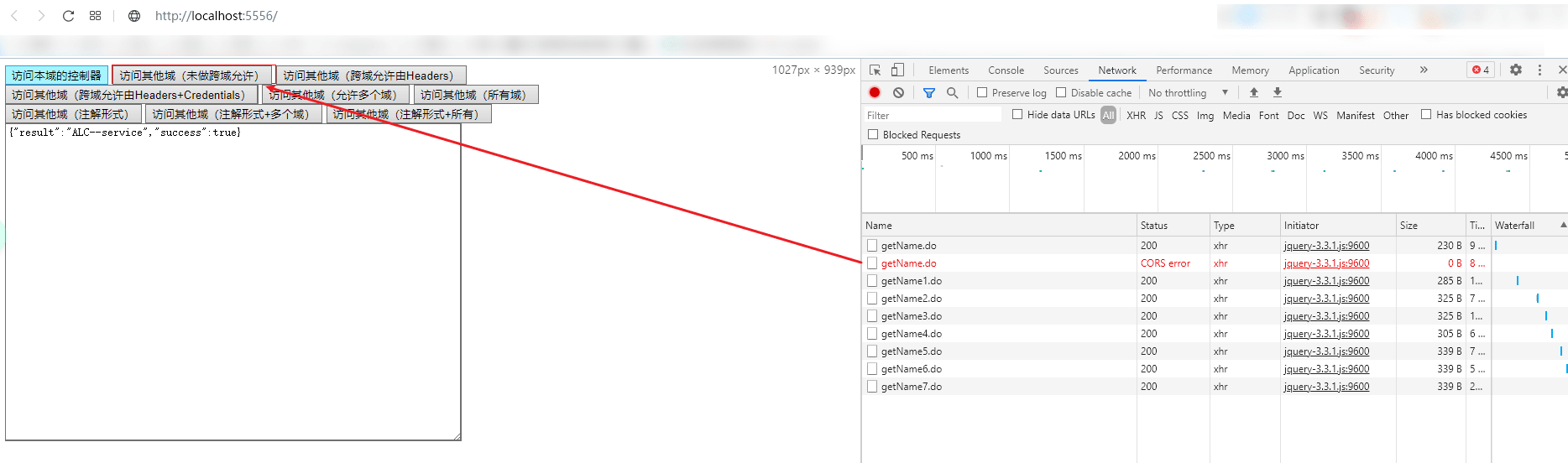
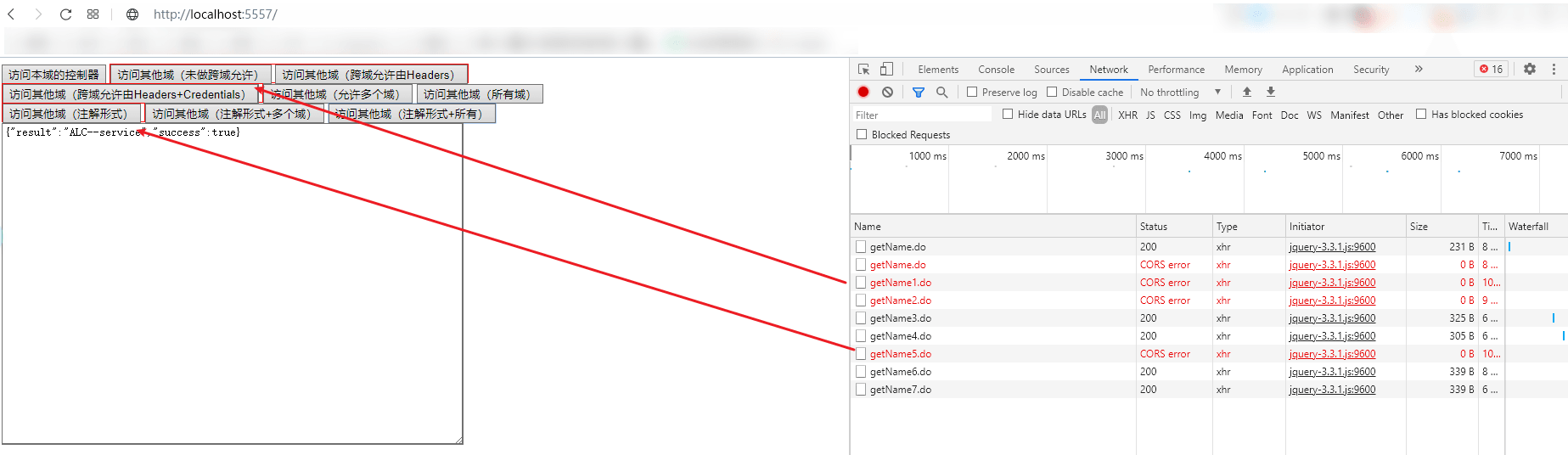
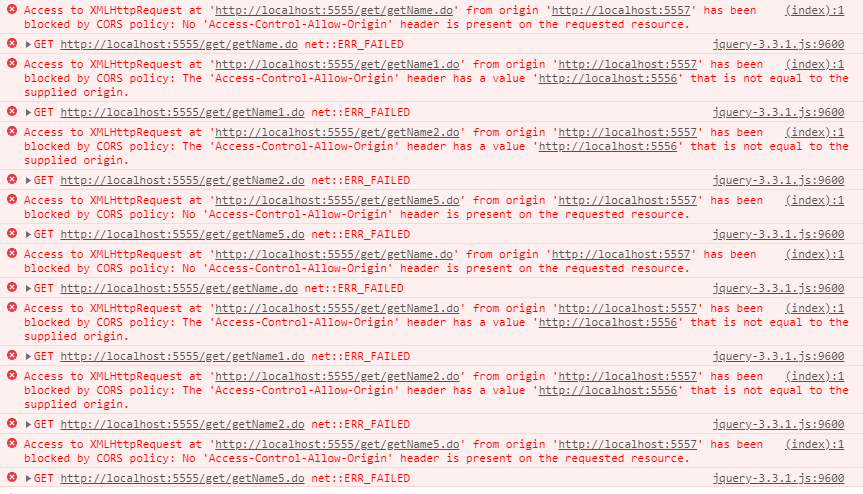


评论 0
还没有评论,来说点什么吧。