引言
FreeMarker 是一种前端模板引擎,通常可以通过模板来批量生成静态页面,当然也可以做一些代码的自动生成。众所周知的,访问静态页面的速度相比走Servlet要快得多,如果一个页面,不会经常改变,生成静态页面会减少动态服务器的负载压力,通过静态服务器,如Nginx,Nginx的并发量2~5w,而动态服务器的并发量普遍很低,因此也说明了静态页面的优越性。倘若使用Tomcat来处理静态页面,岂不是大材小用了?
导入
引用官网中的一张图
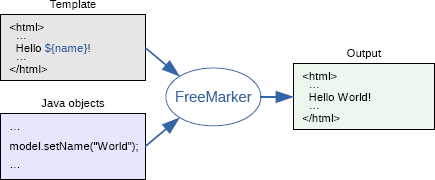
通俗的说是在模板中定义好样式和坑位,然后通过往坑位里放值,从而生成文件。
做个Demo
导入Pom
<?xml version="1.0" encoding="UTF-8"?>
<project xmlns="http://maven.apache.org/POM/4.0.0"
         xmlns:xsi="http://www.w3.org/2001/XMLSchema-instance"
         xsi:schemaLocation="http://maven.apache.org/POM/4.0.0 http://maven.apache.org/xsd/maven-4.0.0.xsd">
    <modelVersion>4.0.0</modelVersion>

    <groupId>top.zunmx</groupId>
    <artifactId>T_FK</artifactId>
    <version>1.0</version>
    <packaging>war</packaging>

    <dependencies>
        <dependency>
            <groupId>org.freemarker</groupId>
            <artifactId>freemarker</artifactId>
            <version>2.3.31</version>
        </dependency>
        <dependency>
            <groupId>org.springframework</groupId>
            <artifactId>spring-webmvc</artifactId>
            <version>5.3.5</version>
        </dependency>
        <dependency>
            <groupId>junit</groupId>
            <artifactId>junit</artifactId>
            <version>4.13.1</version>
            <scope>test</scope>
        </dependency>
        <dependency>
            <groupId>org.springframework</groupId>
            <artifactId>spring-test</artifactId>
            <version>5.3.5</version>
        </dependency>
    </dependencies>

</project>
生成器
package top.zunmx.demo;

import freemarker.template.Configuration;
import freemarker.template.Template;

import java.io.File;
import java.io.FileWriter;
import java.io.Writer;
import java.util.*;

public class Maker {
    public static void main(String[] args) throws Exception {
        //step 1
        Configuration configuration = new Configuration(Configuration.getVersion());
        //step 2
        configuration.setDirectoryForTemplateLoading(new File(new File("").getAbsolutePath() + "/src/main/webapp/template/"));
        //step 3
        configuration.setURLEscapingCharset("utf-8");
        //step 4
        Template template = configuration.getTemplate("template.ftl");
        //step 5
        Map<String, Object> info = new HashMap<String, Object>();
        info.put("name", "zunmx");
        info.put("age", 20);
        info.put("website", "https://www.zunmx.top");
        info.put("date", new Date());

        List<String> skill = new ArrayList<String>();
        skill.add("Java");
        skill.add("Python");
        skill.add("C++");
        skill.add("PHP");
        info.put("skill", skill);

        List<Object> goodsList = new ArrayList<Object>();
        Map<String, Object> goods1 = new HashMap<String, Object>();
        goods1.put("name", "Dell Gaming 7567");
        goods1.put("cate", "Computer");
        goods1.put("price", 7999);
        goodsList.add(goods1);
        Map<String, Object> goods2 = new HashMap<String, Object>();
        goods2.put("name", "Red MI 8 PRO");
        goods2.put("cate", "Phone");
        goods2.put("price", 1499);
        goods2.put("status", 1);
        goodsList.add(goods2);
        Map<String, Object> goods3 = new HashMap<String, Object>();
        goods3.put("name", "MI Band 5");
        goods3.put("cate", "Watch");
        goods3.put("price", 219);
        goodsList.add(goods3);

        info.put("goods", goodsList);

        //step 6
        Writer out = new FileWriter(new File("./src/main/webapp", "info.html"));
        //step 7
        template.process(info, out);
        //step 8
        out.close();

    }
}
模板文件
footer(页脚)
<div>
    设为首页 关于(About) 意见反馈 帮助中心 京公网安备123456789号 京ICP证123456号 ©2021 DEMO
</div>
footer(页首)
<h1>
    Zunmx FTL demo Head
</h1>
正文
<html>
<head>
    <meta charset="UTF-8">
    <title>FreeMarker Demo</title>
</head>
<body>
<#include "header.ftl"/>
<div>
    <#-- 这是 注释 -->
    <h6>模板产生于 ${date?date} ${date?time} 也就是说${date?datetime},这是我们自定义的格式:${date?string("yyyy-MM-dd HH:mm:ss.sss")}</h6>
    <h6>这样呢?${.now}</h6>
    <h6><#list 1..10 as n>${n}</#list></h6>
    <h5>哈喽啊,我是${name}</h5>

    <#assign linkman="zunmx">
    ---${linkman}---<br/>

    <#if name="zunmx">
        <p>欢迎您${name}</p>
    <#else>
        <p>${name}不是主人</p>
    </#if>

    <#assign _0 ='{"name":"howl","age":"22"}'/>
    <#assign data=_0?eval/>
    <table>
        <th><span style="color: brown">name</span></th>
        <th><span style="color: brown">age</span></th>
        <tr>
            <td>${data.name}</td>
            <td>${data.age}</td>
        </tr>
    </table>
    技能表:
    <#list skill as item>
    <span>${item_index+1}、${item} </span>
    </#list><br/>
    共展示了<span style="color: red">${skill?size}</span>个技能
    <table>
        <th>序号</th>
        <th>商品名</th>
        <th>商品类别</th>
        <th>价格</th>
        <th>价格(不转换)</th>
        <th>价格(货币)</th>
        <th>状态</th>
        <#list goods as item>
            <tr>
                <td>${item?index+1}</td>
                <td>${item.name}</td>
                <td>${item.cate}</td>
                <td>${item.price}</td>
                <td>${item.price?c}</td>
                <td>${item.price?string.currency}</td>
                <td><#if item.status?? >√<#else>×</#if></td>
            </tr>
        </#list>
    </table>


</div>

<#include "footer.ftl"/>
</body>
</html>
测试
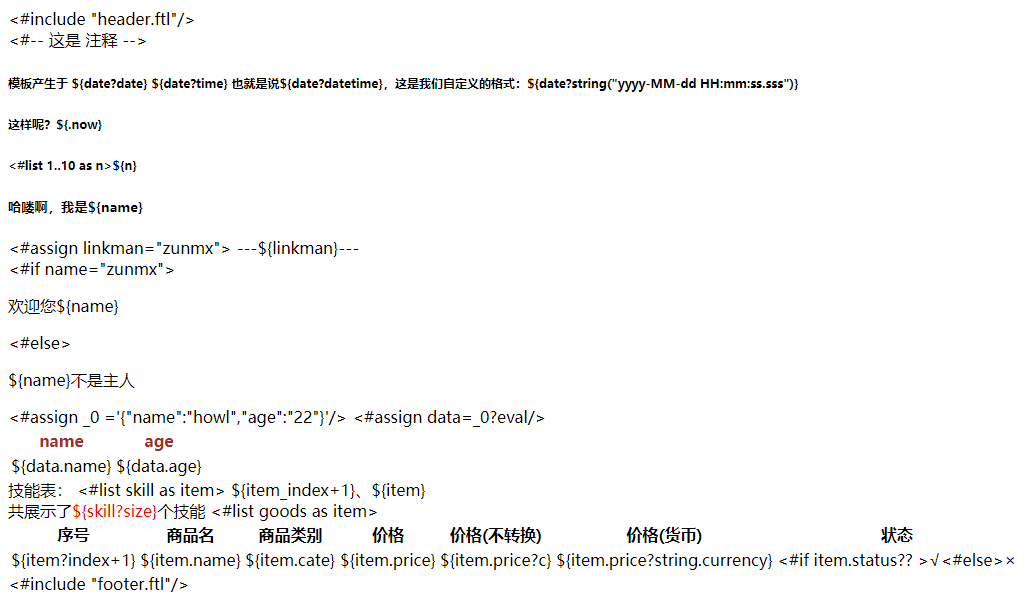
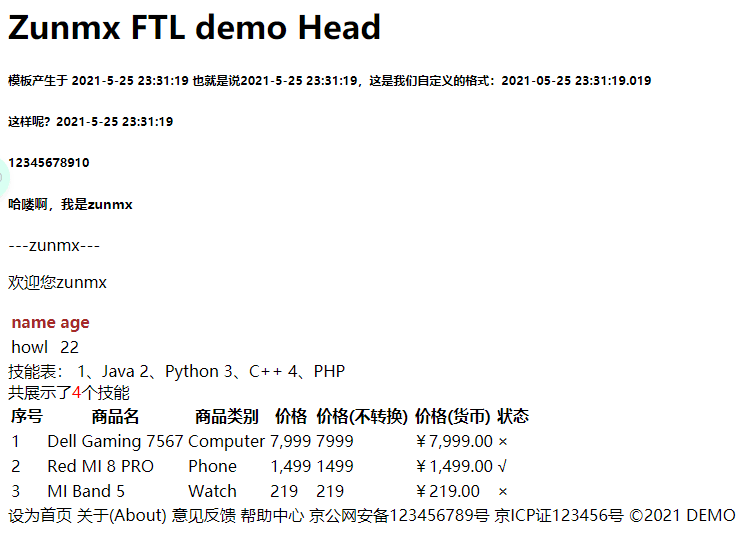
这样也深刻的表明了导入中的那张图,通过模板和定义的值,进而生成文件


评论 0
还没有评论,来说点什么吧。