引言
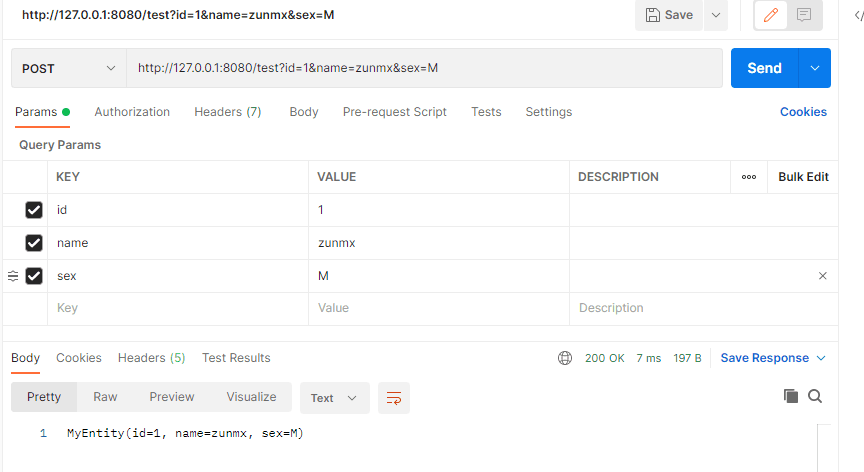
写完接口后通过PostMan测试过接口,可以正常请求,但是项目的前端是Vue写的,使用的Axios,说请求不到数据,随后添加了toString方法,打包部署,发现后端确实无法接收到参数,但是PostMan可以呀,所以排除了接口问题,所以对前端进行梳理。
接口的Demo
Controller
@RestController
public class bug {
    @PostMapping("/test")
    public String demo (MyEntity entity){
        return entity.toString();
    }
}
Entity
@Data
@AllArgsConstructor
@NoArgsConstructor
@ToString
public class MyEntity {
    private Integer id;
    private String name;
    private String sex;
}
前端
Axios 原方法
axios({
    method: 'post',
    url: 'http://127.0.0.1:8080/test',
    data: {"id": this.id, "name": this.name, "sex": this.sex},
}).then(res => {
    this.rst = res.data
})
Axios 新方法
axios({
    method: 'post',
    url: 'http://127.0.0.1:8080/test',
    data: {"id": this.id, "name": this.name, "sex": this.sex},transformRequest: [
        function (data) {
            let ret = ''
            for (let it in data) {
                ret += encodeURIComponent(it) + '=' + encodeURIComponent(data[it]) + '&'
            }
            ret = ret.substring(0, ret.lastIndexOf('&'));
            return ret
        }
    ],
    headers: {
        'Content-Type': 'application/x-www-form-urlencoded'
    }
}).then(res => {
    this.rst = res.data
})
现象
PostMan请求接口返回的数据
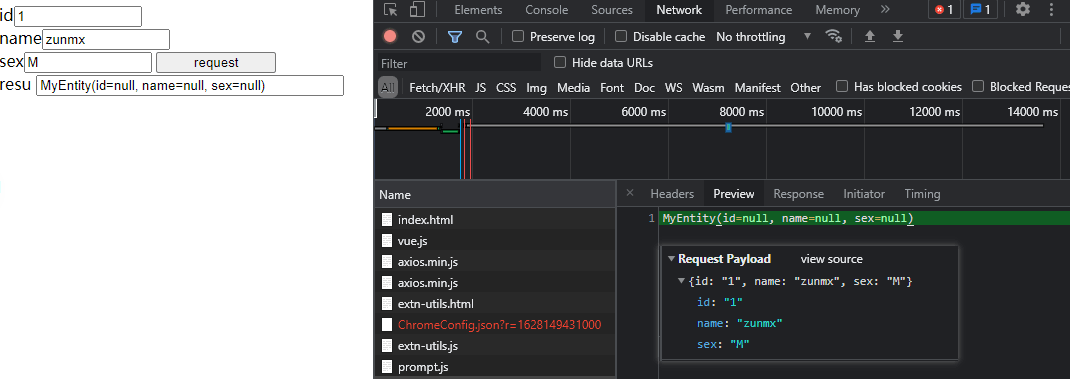
不加transformRequest时
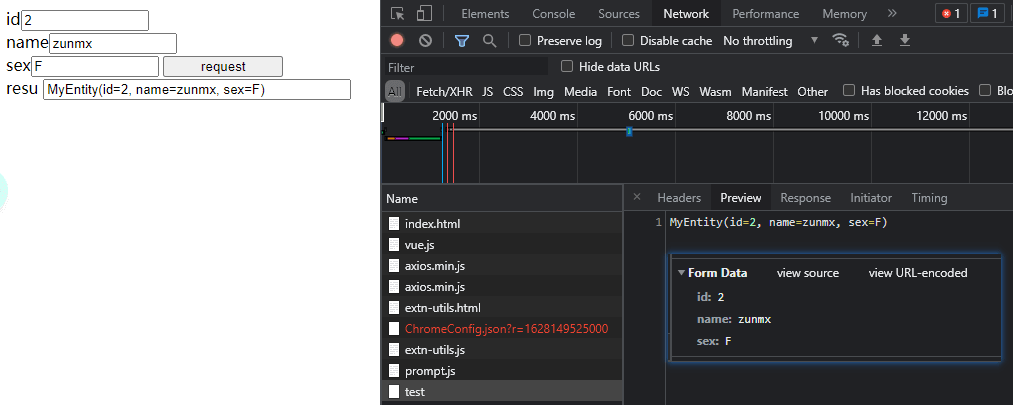
加transformRequest时
前端Demo
<!DOCTYPE html>
<html lang="en">
<head>
    <meta charset="UTF-8">
    <title>Demo</title>
    <script src="https://cdn.jsdelivr.net/npm/vue@2/dist/vue.js"></script>
    <script src="https://unpkg.com/axios/dist/axios.min.js"></script>
</head>
<body>
<div id="app">
    <span>id</span><input v-model="id" style="width:120px;"/> <br/>
    <span>name</span><input v-model="name" style="width:120px;"><br/>
    <span>sex</span><input v-model="sex" style="width:120px;">
    <button @click="req" style="width:120px;">request</button>
    <br/>
    <span>resu </span><input type="text" readonly v-model="rst" style="width:300px;">
</div>
</body>

<script>
    var app = new Vue({
        el: "#app",
        data: {
            id: 0,
            name: "",
            sex: "",
            rst: ""
        },
        methods: {
            req: function () {
                axios({
                    method: 'post',
                    url: 'http://127.0.0.1:8080/test',
                    data: {"id": this.id, "name": this.name, "sex": this.sex},
                    transformRequest: [
                        function (data) {
                            let ret = ''
                            for (let it in data) {
                                ret += encodeURIComponent(it) + '=' + encodeURIComponent(data[it]) + '&'
                            }
                            ret = ret.substring(0, ret.lastIndexOf('&'));
                            return ret
                        }
                    ],
                    headers: {
                        'Content-Type': 'application/x-www-form-urlencoded'
                    }
                }).then(res => {
                    this.rst = res.data
                })
            }
        }
    })
</script>
</html>


评论 0
还没有评论,来说点什么吧。