引言
这也是最后的倔强了,当你写代码的时候,ctrl+z 都回不去了,可以考虑适用录屏来做版本管理,哈哈哈哈哈。
准备工作
之前下载编译好的ffmpeg,dshow不能用,所以建议直接找Screen Capturer Recorder,我这儿提供一个下载地址,也可以自己在网上找。
Screen Capturer Recorder
下载并且安装完成后,可以看到其中已经内置了ffmpeg了。
路径:D:\Software\Screen Capturer Recorder\configuration_setup_utility\vendor\ffmpeg\bin
提示
最好使用Screen Capturer Recorder自带的ffmpeg,否则可能录屏失败
代码
import subprocess
import datetime
import os
import threading

base_path = "E:\\录屏\\"
log_path = "E:\\录屏\\"

def delete_expired_file():
    listdir = os.listdir(base_path)
    for file in listdir:
        stat = os.stat(os.path.join(base_path, file))
        delta = datetime.datetime.now() - datetime.datetime.fromtimestamp(stat.st_ctime)
        deleteFlag = delta.days > 3  # 保留三天内的录屏
        if deleteFlag:
            try:
                os.remove(os.path.join(base_path, file))
            except Exception as e:
                pass
            try:
                os.remove(os.path.join(log_path, file.replace('.mp4', '.log')))
            except Exception as e:
                pass
        print(f"""[i] file={file}, delta={delta}, deleteFlag={deleteFlag}""")


if __name__ == '__main__':
    if not os.path.exists(log_path):
        os.mkdir(log_path)
    while True:
        current_time = datetime.datetime.strftime(datetime.datetime.now(), "%Y%m%d_%H%M%S")
        ffmpeg = r""""D:\Software\Screen Capturer Recorder\configuration_setup_utility\vendor\ffmpeg\bin\ffmpeg.exe" """
        # ffmpeg = r"""D:\tools\多媒体类\ffmpeg\ffmpeg.exe"""
        out = fr""" "{base_path}{current_time}.mp4" """
        cmd = ffmpeg + \
              f""" -f dshow -i audio="麦克风阵列 (适用于数字麦克风的英特尔® 智音技术)"  -f dshow -i audio="virtual-audio-capturer" """ \
              f"""-filter_complex amix=inputs=2:duration=first:dropout_transition=0 -f dshow -i video="screen-capture-recorder" -r 24 """ \
              f"""-t 0:1:0 -crf 24 -pix_fmt yuv420p -preset:v veryfast  {out}"""
        f = open(f'{log_path}{current_time}.log', 'w')
        popen = subprocess.Popen(cmd, stderr=f, stdout=f, stdin=f, creationflags=subprocess.CREATE_NO_WINDOW)
        t = threading.Thread(target=delete_expired_file)
        t.start()
        t.join()
        print(f"[i] Recording {current_time}")
        popen.wait()
        f.close()
注意
其中麦克风阵列 (适用于数字麦克风的英特尔® 智音技术)要和你电脑的声卡对应上,查看设备列表是通过命令。
ffmpeg -list_devices true -f dshow -i dummy

...
[dshow @ 000001fb6a67a700] "DroidCam Source 3" (video)
[dshow @ 000001fb6a67a700]   Alternative name "@device_pnp_\\?\root#media#0000#{65e8773d-8f56-11d0-a3b9-00a0c9223196}\global"
[dshow @ 000001fb6a67a700] "Integrated Webcam" (video)
[dshow @ 000001fb6a67a700]   Alternative name "@device_pnp_\\?\usb#vid_0c45&pid_6a09&mi_00#6&1346d234&0&0000#{65e8773d-8f56-11d0-a3b9-00a0c9223196}\global"
[dshow @ 000001fb6a67a700] "screen-capture-recorder" (video)
[dshow @ 000001fb6a67a700]   Alternative name "@device_sw_{860BB310-5D01-11D0-BD3B-00A0C911CE86}\{4EA69364-2C8A-4AE6-A561-56E4B5044439}"
[dshow @ 000001fb6a67a700] "DroidCam Source 2" (video)
[dshow @ 000001fb6a67a700]   Alternative name "@device_sw_{860BB310-5D01-11D0-BD3B-00A0C911CE86}\{9E2FBAC0-C951-4AA8-BFA9-4B196644964C}"
[dshow @ 000001fb6a67a700] "OBS Virtual Camera" (video)
[dshow @ 000001fb6a67a700]   Alternative name "@device_sw_{860BB310-5D01-11D0-BD3B-00A0C911CE86}\{A3FCE0F5-3493-419F-958A-ABA1250EC20B}"
[dshow @ 000001fb6a67a700] "麦克风阵列 (适用于数字麦克风的英特尔® 智音技术)" (audio)
[dshow @ 000001fb6a67a700]   Alternative name "@device_cm_{33D9A762-90C8-11D0-BD43-00A0C911CE86}\wave_{6406C531-6546-4ED3-9606-A12E249BA25D}"
[dshow @ 000001fb6a67a700] "virtual-audio-capturer" (audio)
[dshow @ 000001fb6a67a700]   Alternative name "@device_sw_{33D9A762-90C8-11D0-BD43-00A0C911CE86}\{8E146464-DB61-4309-AFA1-3578E927E935}"
dummy: Immediate exit requested
...
找到音频设备,替换一下就好了。
一分钟一个视频,因为我发现录制到一半的时候,强制结束ffmpeg后视频可能有打不开的风险。
乱码
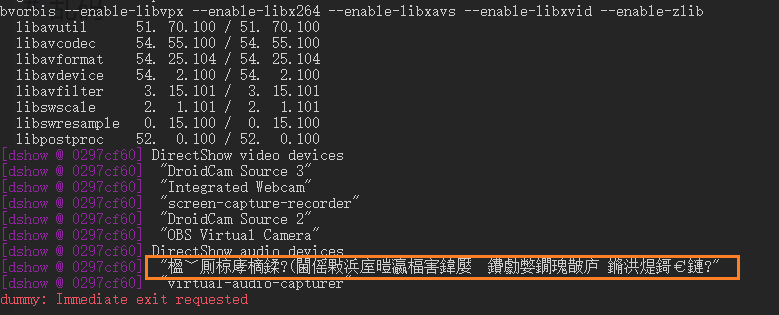
在cmd中执行
chcp 65001
再进行查看设备列表
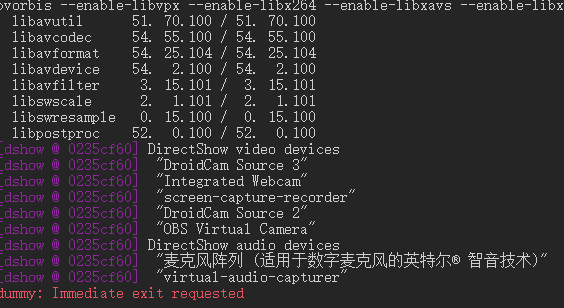
疑难解答
今天发现屏幕录制的尺寸不对,是因为手欠瞎搞搞的。
打开目录C:\ProgramData\Microsoft\Windows\Start Menu\Programs\Screen Capturer Recorder\configure
运行configure by resizing a transparent window Screen Capturer Recorder
最大化窗口,点击按钮,就是全屏的尺寸了。

评论 0
还没有评论,来说点什么吧。