引言
最近的项目里用到了搜索引擎,我脑子里第一想法是,莫非模糊查询,直接查整张表?这负载不得炸掉嘛,况且机器性能也不是很高,所以深度思考过后,想到了Solr,那就简单说说Solr吧
简介
Solr就相当于一个搜索引擎,我们把数据库中的数据存到Solr库中,然后检索内容的时候,在Solr里进行就好了,也相当于给后台的DB减压了,Solr现在也是由Apache基金会托管(不得不说,Apache托管的好东西真多),Solr也是由Java开发的,是基于Lucene的全文搜索服务器,巴拉巴拉巴拉,不赘述了。
安装
准备工作
- 因为Solr是基于Java开发的,所以需要Java的运行时环境,也就是JRE(话说我们开发环境不用再配置了吧🤭)
-
下载Solr
因为我接触的版本是7.2.1版本,曾经尝试升到8.n,项目就报出莫名其妙的错误。
由于工期影响,只好换回了原来的版本。
但是今天时间还算充裕,就下载官网上提供的7代的版本,遇到问题就解决问题吧。
:tipping_hand_woman:框架以及组件使用时,并不是最新版就是最好的,基于稳定性和兼容性考虑才是最重要的。
下载地址:https://mirrors.tuna.tsinghua.edu.cn/apache/lucene/solr/7.7.3/solr-7.7.3.zip
-
解压到相应的路径,因为我开发环境是Windows系统,所以就本地开发了。
我解压到了Z:\dev\solr-7.7.3
-
现在我们尝试运行一下,熟悉一下提供的Web页面吧
打开bin目录,然后启动终端(Windows可以在地址栏输入cmd,这样就是当前路径的终端了)。
输入一下命令,启动Solr服务
bash
solr start
当提示如下信息,就说明,已经运行成功了,默认端口号是8983,打开浏览器,访问一下试试呢
bash
Waiting up to 30 to see Solr running on port 8983
Started Solr server on port 8983. Happy searching!
5. 一般不会出现错误,当你看到Solr的仪表盘页面,说明Solr已经启动成功了。
创建数据库
因为我们的Solr是提供搜索服务的,以我们的搜索引擎来说,我们需要数据源,以数据库角度来讲,我们需要创建数据库,所以我们要创建一个core,对于Solr来讲,core相当于一个数据库,或是说查询和检索的综合体。
使用如下命令,创建一个核心
solr create -c mycore
如果不小心写错了,不要紧,我们通过如下命令删除核心
solr delete -c mycore
当提示如下信息,说明核心创建完成
WARNING: Using _default configset with data driven schema functionality. NOT RECOMMENDED for production use.
         To turn off: bin\solr config -c mycore -p 8983 -action set-user-property -property update.autoCreateFields -value false
Created new core 'mycore'
:tipping_hand_man: 这里的警告是说明使用的是默认的配置,我感觉没什么不妥,如果要是细节调优,可以走自己的配置,这里不进行赘述了。
当然,你也可以从Web页面中创建核心,CoreAdmin--Add Core
部署Java项目
先测试
- 导入依赖
<dependencies>
<dependency>
<groupId>org.apache.solr</groupId>
<artifactId>solr-solrj</artifactId>
<version>7.4.0</version>
</dependency>
<dependency>
<groupId>org.projectlombok</groupId>
<artifactId>lombok</artifactId>
<version>RELEASE</version>
<scope>compile</scope>
</dependency>
</dependencies>
```
2. 写一个工具类,目前只是假数据
```java
package com.alc.utils;
import org.apache.solr.client.solrj.SolrServerException;
import org.apache.solr.client.solrj.impl.HttpSolrClient;
import org.apache.solr.common.SolrInputDocument;
import java.io.IOException;
public class SolrUtil {
public static void main(String[] args) throws IOException, SolrServerException {
String solrUrl = "http://localhost:8983/solr/mycore";
HttpSolrClient solrClient = new HttpSolrClient.Builder(solrUrl)
.withConnectionTimeout(10000) // 连接超时时间
.withSocketTimeout(60000) // 通讯超时时间
.build(); // 构造
SolrInputDocument solrInputFields = new SolrInputDocument();
solrInputFields.addField("Demo","abc");
solrInputFields.addField("name","尊暮萧");
solrInputFields.addField("age","22");
solrInputFields.addField("website","https://www.zunmx.top");
solrClient.add(solrInputFields);
solrInputFields = new SolrInputDocument();
solrInputFields.addField("Demo","bcd");
solrInputFields.addField("name","爱新觉罗·婉辰");
solrInputFields.addField("age","20");
solrInputFields.addField("website","https://zunmx.top");
solrClient.add(solrInputFields);
solrInputFields = new SolrInputDocument();
solrInputFields.addField("Demo","bcd");
solrInputFields.addField("name","上官·瑞雪");
solrInputFields.addField("age","20");
solrInputFields.addField("website","https://zunmx.top");
solrClient.add(solrInputFields);
solrClient.commit();
}
}
```
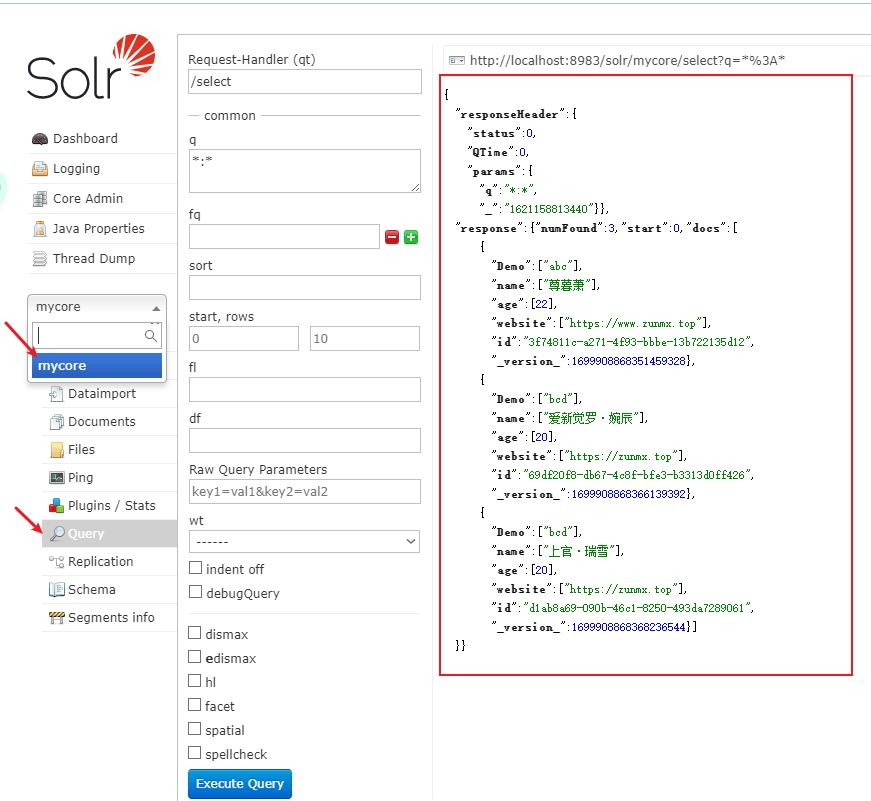
3. 运行试试,然后在Web页面中查询一下所有,是不是就把我们刚刚存进去的数据查出来了。
### 再实战
这里我们走真数据吧,我手头正好有乌云的镜像,恰好也是MySQL数据库,还恰好搜索字段是HTML页面,数据量肯定是够用的,玩一玩也可以哈。
1. 导入MySQL和druid的依赖
```xml
<dependencies>
<dependency>
<groupId>org.apache.solr</groupId>
<artifactId>solr-solrj</artifactId>
<version>7.4.0</version>
</dependency>
<dependency>
<groupId>org.projectlombok</groupId>
<artifactId>lombok</artifactId>
<version>RELEASE</version>
<scope>compile</scope>
</dependency>
<dependency>
<groupId>com.alibaba</groupId>
<artifactId>druid</artifactId>
<version>1.2.4</version>
</dependency>
<dependency>
<groupId>mysql</groupId>
<artifactId>mysql-connector-java</artifactId>
<version>8.0.21</version>
</dependency>
</dependencies>
```
2. 上代码吧
```java
String solrUrl = "http://localhost:8983/solr/mycore";
HttpSolrClient solrClient = new HttpSolrClient.Builder(solrUrl)
.withConnectionTimeout(10000) // 连接超时时间
.withSocketTimeout(60000) // 通讯超时时间
.build(); // 构造
SolrInputDocument solrInputFields = new SolrInputDocument();
DruidDataSource source = new DruidDataSource();
source.setDriverClassName("com.mysql.cj.jdbc.Driver");
source.setUrl("jdbc:mysql://localhost:3306/wooyun?serverTimezone=UTC");
source.setUsername("study");
source.setPassword("123456");
DruidPooledConnection conn = source.getConnection();
Statement statement = conn.createStatement();
String sql = "SELECT * FROM bugs";
ResultSet resultSet = statement.executeQuery(sql);
while (resultSet.next()){
solrInputFields = new SolrInputDocument();
solrInputFields.addField("id", resultSet.getInt("id"));
solrInputFields.addField("wybug_title", resultSet.getString("wybug_title"));
solrInputFields.addField("wybug_date", resultSet.getString("wybug_date"));
solrInputFields.addField("wybug_level", resultSet.getString("wybug_level"));
solrInputFields.addField("wybug_detail", resultSet.getString("wybug_detail"));
solrInputFields.addField("Ranks", resultSet.getInt("Ranks"));
solrClient.add(solrInputFields);
}
solrClient.commit();
```
此时我们已经把数据存入到了Solr库中了。
### 查询数据
```java
String solrUrl = "http://localhost:8983/solr/mycore";
HttpSolrClient solrClient = new HttpSolrClient.Builder(solrUrl)
.withConnectionTimeout(10000) // 连接超时时间
.withSocketTimeout(60000) // 通讯超时时间
.build(); // 构造
long start = System.currentTimeMillis();
SolrQuery query = new SolrQuery();
query.setQuery("wybug_title:*QQ*");
query.setRows(999999999); // 默认分页
QueryResponse response = solrClient.query(query);
SolrDocumentList results = response.getResults();
for (SolrDocument result : results) {
Set<String> keys = result.keySet();
System.out.println(result.get("wybug_title"));
// for (String key : keys) {
// System.out.println(key + "-->" + result.get(key));
// }
}
long end = System.currentTimeMillis();
System.out.println("Number:"+results.getNumFound());
System.out.println("Time:"+(end-start));
这时,我们可以看控制台,输出中包含QQ字样的标题了。
SLF4J: Failed to load class "org.slf4j.impl.StaticLoggerBinder".
SLF4J: Defaulting to no-operation (NOP) logger implementation
SLF4J: See http://www.slf4j.org/codes.html#StaticLoggerBinder for further details.
[QQ某站存在xxs漏洞可获取cookies登陆QQ空间]
[安卓版qq某版本泄漏对好友的备注]
[从腾讯微博到QQ号可以社到各种名人的QQ]
[利用QQ空间黄钻被挡访客获取网站访客QQ号码]
[WP8 QQ客户端(V4.3.1.3645)可向任意用户发起语音通话]
[手机QQ安卓版两处跨域问题]
[QQ邮箱XXE可读取任意文件]
[一种通过flash的方式获取访客QQ号]
[QQ邮箱残留XSS漏洞]
[QQ邮箱一处存储型xss]
... ...
[QQ空间某处SSRF                                      ]
[我是如何任意查询QQ绑定的密保手机号(白帽子QQ号为例)                                      ]
[看我如何用一条链接就能获取到你的QQClientKey                                      ]
[信息挖掘之GetShell夏商集团内网服务器&夏商集团内网探测(QQ群渗透案例)                                      ]
Number:782
Time:283

Process finished with exit code 0
效率对比
下面我们使用MySQL查询数据库,代码如下
DruidDataSource source = new DruidDataSource();
source.setDriverClassName("com.mysql.cj.jdbc.Driver");
source.setUrl("jdbc:mysql://localhost:3306/wooyun?serverTimezone=UTC");
source.setUsername("study");
source.setPassword("123456");
DruidPooledConnection conn = source.getConnection();
Statement statement = conn.createStatement();
long start = System.currentTimeMillis();
String sql = "SELECT * FROM bugs WHERE wybug_title LIKE '%QQ%'";
ResultSet resultSet = statement.executeQuery(sql);
int i = 0;
while (resultSet.next()) {
    i++;
    System.out.println(resultSet.getString("wybug_title"));
}
long end = System.currentTimeMillis();
System.out.println("Number:"+i);
System.out.println("Time:"+(end-start));
结果集如下
SLF4J: Failed to load class "org.slf4j.impl.StaticLoggerBinder".
SLF4J: Defaulting to no-operation (NOP) logger implementation
SLF4J: See http://www.slf4j.org/codes.html#StaticLoggerBinder for further details.
QQ某站存在xxs漏洞可获取cookies登陆QQ空间
安卓版qq某版本泄漏对好友的备注
从腾讯微博到QQ号可以社到各种名人的QQ
利用QQ空间黄钻被挡访客获取网站访客QQ号码
WP8 QQ客户端(V4.3.1.3645)可向任意用户发起语音通话
手机QQ安卓版两处跨域问题
QQ邮箱XXE可读取任意文件
一种通过flash的方式获取访客QQ号
... ...
QQ邮箱命某处令执行
QQ上你点啊点/H5拿你的授权/微博oauth有点弱/提权进了你微博
QQ空间某处SSRF
我是如何任意查询QQ绑定的密保手机号(白帽子QQ号为例)
看我如何用一条链接就能获取到你的QQClientKey
信息挖掘之GetShell夏商集团内网服务器&夏商集团内网探测(QQ群渗透案例)
Number:782
Time:496
记录条数是一样的,但是时间上Solr少了一半左右。
删除操作
String solrUrl = "http://localhost:8983/solr/mycore";
HttpSolrClient solrClient = new HttpSolrClient.Builder(solrUrl)
    .withConnectionTimeout(10000)  // 连接超时时间
    .withSocketTimeout(60000) // 通讯超时时间
    .build(); // 构造
SolrInputDocument solrInputFields = new SolrInputDocument();
solrClient.deleteByQuery("Demo:*");
solrClient.commit();


评论 0
还没有评论,来说点什么吧。