引言
烦人的小傻瓜为了这个项目头疼了好几天,非要用原生的mt-datetime-picker,看了看官方的Demo,可以自定义这种联动选择,当年C++写的平闰年,自己开发一个组件也可以。
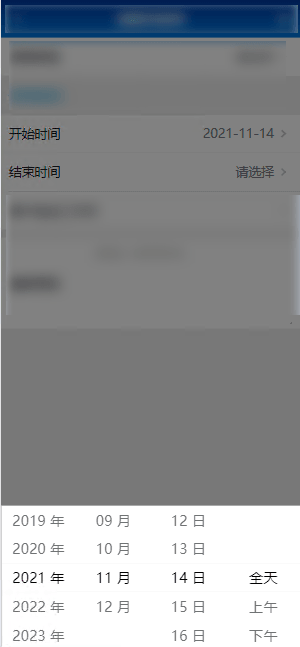
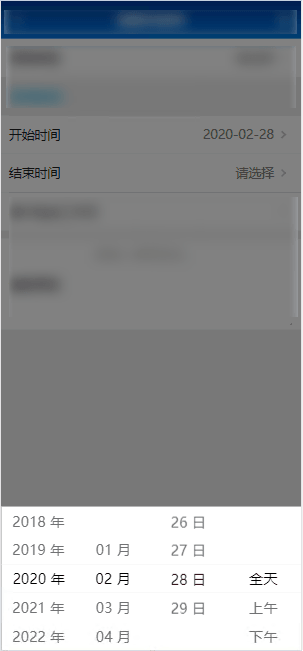
效果图
代码
组件代码
<template>
  <div>
        <mt-picker
          :slots="dataList"
          style="touch-action: none"
          @change="onValuesChange"
        ></mt-picker>
  </div>
</template>

<script type="text/ecmascript-6">
export default {
  data () {
    return {
      calendar: {
        runFlag: false,
        bigMonth: ['01 月', '03 月', '05 月', '07 月', '08 月', '10 月', '12 月'],
        smallMonth: ['04 月', '06 月', '09 月', '11 月'],
        year: [],
        month: [],
        day: [],
        currentYear: '',
        currentMonth: '',
        currentDay: '',
        currentAPM: '全天',
        apm: ['全天', '上午', '下午'],
        startYear: '2010',
        backYearNumber: 30,
      }

    }
  },
  computed: {
    dataList () {
      return [
        {
          flex: 1,
          values: this.calendar.year,
          className: 'slot1',
          textAlign: 'center'
        }, {
          flex: 1,
          values: this.calendar.month,
          className: 'slot2',
          textAlign: 'center'
        }, {
          flex: 1,
          values: this.calendar.day,
          className: 'slot3',
          textAlign: 'center'
        }, {
          flex: 1,
          values: this.calendar.apm,
          className: 'slot4',
          textAlign: 'center'
        }
      ]
    }
  },
  watch: {

  },
  mounted () {
    for (let i = 0; i <= this.calendar.backYearNumber; i++) {
      this.calendar.year.push(Number(this.calendar.startYear) + i + ' 年')
    }
    for (let i = 1; i <= 12; i++) {
      this.calendar.month.push(String(i).padStart(2, '0') + ' 月')
    }
  },
  methods: {
    getResult () {
      this.$emit()
      return this.dateFormatResult
    },
    onValuesChange (picker, values) {
      if (values[0] === undefined) return
      if (values[0].indexOf(' 年') > 0) {
        this.calendar.currentYear = values[0].substr(0, 4)
      } else if (values[0].indexOf(' 月') > 0) {
        this.calendar.currentMonth = values[0].substr(0, 2)
      } else if (values[0].indexOf(' 日') > 0) {
        this.calendar.currentDay = values[0].substr(0, 2)
      } else if (this.calendar.apm.indexOf(values[0]) >= 0) {
        this.calendar.currentAPM = values[0]
      }
      if (!this.calendar.runFlag) {
        picker.setSlotValue(0, String(new Date().getFullYear()) + ' 年')
        picker.setSlotValue(1, String(new Date().getMonth() + 1) + ' 月')
        picker.setSlotValue(2, String(new Date().getDate()) + ' 日')
        picker.setSlotValue(3, this.calendar.currentAPM)
        this.calendar.runFlag = true
        return
      }
      if (this.calendar.bigMonth.indexOf(String(this.calendar.currentMonth) + ' 月') >= 0) {
        this.calendar.day = []
        for (let i = 1; i <= 31; i++) {
          this.calendar.day.push(String(i).padStart(2, '0') + ' 日')
        }
      }
      if (this.calendar.smallMonth.indexOf(String(this.calendar.currentMonth) + ' 月') >= 0) {
        this.calendar.day = []
        for (let i = 1; i <= 30; i++) {
          this.calendar.day.push(String(i).padStart(2, '0') + ' 日')
        }
      }
      if (this.calendar.currentMonth === '02') {
        let days = 0
        let year = Number(this.calendar.currentYear)
        if (year % 400 === 0 || year % 4 === 0 && year % 100 !== 0) {
          days = 29
        } else {
          days = 28
        }
        this.calendar.day = []
        for (let i = 1; i <= days; i++) {
          this.calendar.day.push(String(i).padStart(2, '0') + ' 日')
        }
      }
      this.dateFormatResult = this.calendar.currentYear + this.calendar.currentMonth + this.calendar.currentDay + '000000'
      this.$emit('getDateFormatResult', this.dateFormatResult, this.calendar.currentAPM)
    }
  }
}
</script>

<style>

</style>
父组件部分代码
首先引用这个组件,然后调用
<calendarComp
      @getDateFormatResult="getStartDate"
      v-if="popupVisible1"
      ></calendarComp>
getStartDate (result, apm) {
      this.applyInfo.startDate = result
      console.log(apm)
    }
总结
mint-ui头一次听说,我感觉和el那些也都差不多,只是一个组件库,主要还是实现和设计上,我相信有更简单的方法,因为这里的判断感觉很别扭,毕竟时间也不早了,不优化了,发篇文章记录一下,然后睡觉。
大概就是这样了,因为这个涉及到了公司项目,所以不会贴全部代码,最近疫情在家办公,时间也不太充裕,所以近期更新很慢。

评论 0
还没有评论,来说点什么吧。