引言
最近想要破解一手 sandboxie-plus,在rutracker中找到了他的赞助凭证,但是签名已经被硬编码到SbieSvc.exe中,它本身又被数字签名,不能直接进行修改,想到了DLL注入,在写这篇文章的时候,我还没有成功,这里写一下我的试验思路和过程。
准备工具
- visual studio
- dbgview
- x96dbg (可选)
- die (可选)
准备阶段
// dll_injure_exe.cpp : 此文件包含 "main" 函数。程序执行将在此处开始并结束。
//

#include <windows.h>
#include <stdio.h>
#include <string.h>
#include <iostream>

const char* target_string = "63F49D96BDBA28F8428B4A5008D1A587";
int main() {
    std::cout << "Start\n";

    // Load the version.dll library
    HMODULE hModule = LoadLibrary(L"version.dll");

    std::cout << "Key: " << target_string <<std::endl;
    if (hModule == NULL) {
        std::cerr << "Failed to load version.dll. Error code: " << GetLastError() << std::endl;
        return 1; // Exit with error
    }

    std::cout << "version.dll loaded successfully!" << std::endl;

    // Optionally, retrieve an exported function from the library
    FARPROC pFunction = GetProcAddress(hModule, "GetFileVersionInfoSizeA");

    if (pFunction == NULL) {
        std::cerr << "Failed to find GetFileVersionInfoSizeA. Error code: " << GetLastError() << std::endl;
        // Clean up by freeing the library
        FreeLibrary(hModule);
        return 1; // Exit with error
    }

    std::cout << "GetFileVersionInfoSizeA function address: " << pFunction << std::endl;

    // Use the function pointer as needed (example usage omitted for simplicity)

    // Free the library when done
    if (!FreeLibrary(hModule)) {
        std::cerr << "Failed to free version.dll. Error code: " << GetLastError() << std::endl;
        return 1; // Exit with error
    }

    std::cout << "version.dll unloaded successfully!" << std::endl;
    return 0; // Exit successfully
}
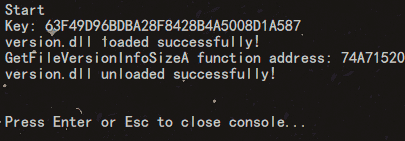
当没有把version.dll放置到exe路径,运行效果如下
准备dll
// dllmain.cpp : 定义 DLL 应用程序的入口点。
#include "pch.h"
#include <windows.h>
#include <stdio.h>
#include <string.h>
const char* target_string = "63F49D96BDBA28F8428B4A5008D1A587";
const char* replacement_string = "12341234123412341234123412341234";

void replace_string_in_memory() {
    OutputDebugStringA("set target_string\n");
    SYSTEM_INFO sys_info;
    GetSystemInfo(&sys_info);

    MEMORY_BASIC_INFORMATION mem_info;
    char* current_address = (char*)sys_info.lpMinimumApplicationAddress;
    char* max_address = (char*)sys_info.lpMaximumApplicationAddress;

    while (current_address < max_address) {
        if (VirtualQuery(current_address, &mem_info, sizeof(mem_info)) == sizeof(mem_info)) {
            // 只处理已提交且包含目标字符串的内存区域
            if (mem_info.State == MEM_COMMIT && (mem_info.Protect & PAGE_READONLY)) {
                OutputDebugStringA("Checking read-only memory region...\n");

                // 查找目标字符串
                for (char* ptr = (char*)mem_info.BaseAddress; ptr < (char*)mem_info.BaseAddress + mem_info.RegionSize - strlen(target_string); ++ptr) {
                    if (memcmp(ptr, target_string, strlen(target_string)) == 0) {
                        // 找到目标字符串,输出调试信息
                        char debugMsg[256];
                        snprintf(debugMsg, sizeof(debugMsg), "Found target string at: %p\n", ptr);
                        OutputDebugStringA(debugMsg);

                        // 修改内存访问权限,使其可写
                        DWORD old_protect;
                        if (VirtualProtect(ptr, strlen(replacement_string), PAGE_READWRITE, &old_protect)) {
                            OutputDebugStringA("Memory protection changed to READWRITE\n");

                            // 替换字符串
                            memcpy(ptr, replacement_string, strlen(replacement_string));

                            // 恢复为只读权限
                            VirtualProtect(ptr, strlen(replacement_string), old_protect, &old_protect);
                            OutputDebugStringA("String replacement successful!\n");

                            MessageBox(NULL, "String replaced successfully!", "DLL Notification", MB_OK);
                            return; // 一旦替换成功,退出函数
                        }
                        else {
                            OutputDebugStringA("Failed to change memory protection.\n");
                        }
                    }
                }
            }
            else {
                OutputDebugStringA("Skipping non-readonly memory region.\n");
            }
        }
        current_address += mem_info.RegionSize;
    }

    OutputDebugStringA("Target string not found in memory.\n");
}


BOOL APIENTRY DllMain(HMODULE hModule, DWORD ul_reason_for_call, LPVOID lpReserved) {
    OutputDebugStringA("ZUNMX called\n");
    printf("[#] DLL LOADED!\n");
    switch (ul_reason_for_call) {
    case DLL_THREAD_ATTACH:
        OutputDebugStringA("DLL_THREAD_ATTACH called\n");
        replace_string_in_memory();
        break;
    case DLL_THREAD_DETACH:
        OutputDebugStringA("DLL_THREAD_DETACH called\n");
        break;
    case DLL_PROCESS_DETACH:
        OutputDebugStringA("DLL_PROCESS_DETACH called\n");
        break;

    case DLL_PROCESS_ATTACH:
        OutputDebugStringA("DLL_PROCESS_ATTACH called\n");
        replace_string_in_memory();
        break;

    }
    return TRUE;
}
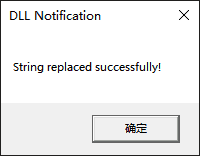
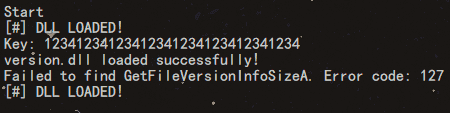
当exe和dll在相同路径中时,运行结果如下。
目录结构如下:

需要优化的地方
- 新的VERSION.dll并没有导出原来的函数,如果exe程序没有做一些异常捕获,可能导致程序异常。
- 如果目标程序没有导入VERSION.dll,那么这样做就没用了。
dll注入的优势
当目标程序被签名、无法轻易修改、加强壳时可考虑这种办法。
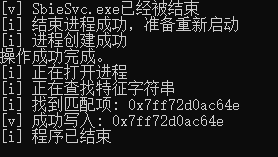


评论 0
还没有评论,来说点什么吧。