qt 在线安装器指定镜像

引言

安装新版本的qt不再支持离线安装了,只能用在线的安装器安装,然而服务器在境外(有一个在芬兰),下载速度真的是泪崩呀。

参数列表

Usage: qt-unified-windows-x64-4.6.0-online.exe [options] command <args> <key=value>

Qt Installer Framework supports both GUI and headless mode. The installation operations can be invoked with the following commands and options. Note that the options marked with "CLI" are available in the headless mode only.

Commands:
  in, install - install default or selected packages - <pkg ...>
  ch, check-updates - show available updates information on maintenance tool
  up, update - update all or selected packages - <pkg ...>
  rm, remove - uninstall packages and their child components - <pkg ...>
  li, list - list currently installed packages - <regexp>
  se, search - search available packages - <regexp>
    Note: The --filter-packages option can be used to specify
    additional filters for the search operation
  co, create-offline - create offline installer from selected packages - <pkg ...>
  cc, clear-cache - clear contents of the local metadata cache
  pr, purge - uninstall all packages and remove entire program directory

Options:
  -?, -h, --help                                 Displays help on commandline
                                                 options.
  --help-all                                     Displays help including Qt
                                                 specific options.
  -v, --version                                  Displays version information.
  -d, --verbose                                  Verbose mode. Prints out more
                                                 information. Adding -d or
                                                 --verbose more than once
                                                 increases verbosity.
  -g, --logging-rules <rules>                    Enables logging according to
                                                 passed rules. Comma separated
                                                 logging rules have the
                                                 following syntax:
                                                 loggingCategory=true/false.
                                                 Passing empty logging rules
                                                 enables all logging categories.
                                                 The following rules enable a
                                                 single category: ifw.*=false,
                                                 ifw.category=true. The
                                                 following logging categories
                                                 are available:
                                                 ifw.installer.installlog
                                                 ifw.server
  --ar, --add-repository <URI,...>               Add a local or remote
                                                 repository to the list of user
                                                 defined repositories.
  --at, --add-temp-repository <URI,...>          Add a local or remote
                                                 repository to the list of
                                                 temporary available
                                                 repositories.
  --st, --set-temp-repository <URI,...>          Set a local or remote
                                                 repository as temporary
                                                 repository, it is the only one
                                                 used during fetch.
                                                 Note: URI must be prefixed with
                                                 the protocol, i.e. file:///,
                                                 https://, http:// or ftp://.
  --sp, --system-proxy                           Use system proxy on Windows
                                                 and Linux. This option has no
                                                 effect on macOS. (Default)
  --np, --no-proxy                               Do not use system proxy.
  --su, --start-updater                          Start application in updater
                                                 mode. This will override the
                                                 internal marker that is used to
                                                 distinguish which kind of
                                                 binary is currently running.
  --sm, --start-package-manager                  Start application in package
                                                 manager mode. This will
                                                 override the internal marker
                                                 that is used to distinguish
                                                 which kind of binary is
                                                 currently running.
  --sr, --start-uninstaller                      Start application in
                                                 uninstaller mode. This will
                                                 override the internal marker
                                                 that is used to distinguish
                                                 which kind of binary is
                                                 currently running.
  -t, --root <directory>                         [CLI] Set installation root
                                                 directory.
  --oi, --offline-installer-name <filename>      [CLI] Set custom filename for
                                                 the generated offline
                                                 installer. Without this the
                                                 original filename is used with
                                                 an added "_offline-yyyy-MM-dd"
                                                 suffix.
  -p, --platform <plugin>                        Use the specified platform
                                                 plugin.
  --nf, --no-force-installations                 Allow deselecting components
                                                 that are marked as forced.
  --nd, --no-default-installations               Deselects components that are
                                                 marked as default.
  --ns, --no-size-checking                       Disable checking of free space
                                                 for installation target.
  --sv, --show-virtual-components                Show virtual components in
                                                 installer and package manager.
  -i, --install-compressed-repository <URI,...>  Installs QBSP or 7z file. The
                                                 QBSP (Board Support Package)
                                                 file must be a .7z file which
                                                 contains a valid repository.
  --cl, --create-local-repository                Create a local repository
                                                 inside the installation
                                                 directory. This option has no
                                                 effect on online installers.
  --fp, --filter-packages <element=regex,...>    [CLI] Comma separated list of
                                                 additional key-value pair
                                                 filters used to query packages
                                                 with the search command. The
                                                 keys can be any of the possible
                                                 package information elements,
                                                 like "DisplayName" and
                                                 "Description".
  --cp, --cache-path <path>                      Sets the path used for local
                                                 metadata cache. The path must
                                                 be writable by the current
                                                 user.
  --am, --accept-messages                        [CLI] Accepts all message
                                                 queries without user input.
  --rm, --reject-messages                        [CLI] Rejects all message
                                                 queries without user input.
  --aa, --auto-answer <identifier=value>         [CLI] Automatically answers
                                                 the message queries with the
                                                 message identifier and button
                                                 value. Several identifier=value
                                                 pairs can be given separated
                                                 with comma, for example
                                                 --auto-answer
                                                 message.id=Ok,message.id2=Cance
                                                 l.
  --da, --default-answer                         [CLI] Automatically answers to
                                                 message queries with their
                                                 default values.
  --al, --accept-licenses                        [CLI] Accepts all licenses
                                                 without user input.
  --file-query <identifier=value>                [CLI] Automatically sets the
                                                 QFileDialog values
                                                 getExistingDirectory() or
                                                 getOpenFileName() requested by
                                                 install script. Several
                                                 identifier=value pairs can be
                                                 given separated with comma, for
                                                 example --file-query
                                                 filedialog.id=C:/Temp,filedialo
                                                 g.id2=C:/Temp2
  -c, --confirm-command                          [CLI] Confirms starting of
                                                 installation, update or removal
                                                 of components without user
                                                 input.
  -s, --script <file>                            Execute the script given as
                                                 argument.
  --ss, --start-server <mode, socketname, key>   Starts the application as
                                                 headless process waiting for
                                                 commands to execute. Mode can
                                                 be DEBUG or PRODUCTION. In
                                                 DEBUG mode, the option values
                                                 can be omitted. Note: The
                                                 server will not shutdown on his
                                                 own, you need to quit the
                                                 process by hand.
  --sc, --start-client <socketname, key>         Starts the application to
                                                 debug the client-server
                                                 communication. If a value is
                                                 omitted, the client will use a
                                                 default instead. Note: The
                                                 server process is not started
                                                 by the client application in
                                                 that case, you need to start it
                                                 on your own.
  -q, --squish-port <port number>                Give a port where Squish can
                                                 connect to. If no port is
                                                 given, attach to squish not
                                                 done. Note: To enable Squish
                                                 support you first need to build
                                                 IFW with SQUISH_PATH parameter
                                                 where SQUISH_PATH is pointing
                                                 to your Squish installation
                                                 folder: <path_to_qt>/bin/qmake
                                                 -r SQUISH_PATH=<pat_to_squish>
  --mco, --max-concurrent-operations <threads>   Specifies the maximum number
                                                 of threads used to perform
                                                 concurrent operations in the
                                                 unpacking phase of components.
                                                 Set to a positive number, or 0
                                                 (default) to let the
                                                 application determine the ideal
                                                 thread count from the amount of
                                                 logical processor cores in the
                                                 system.
  -m, --email <email>                            [CLI] Email used for Qt
                                                 Account login.
  --pw, --password <password>                    [CLI] Password used for Qt
                                                 Account login.
  --ra, --reset-qtaccount                        Erase Qt Account information
                                                 from disk.
  --ao, --accept-obligations                     [CLI] Accepts Qt Open Source
                                                 usage obligations without user
                                                 input.
  --mirror <mirror>                              Uses the given mirror url for
                                                 opensource downloads.
  --no-save-account, --na                        Does not save the Qt Account
                                                 information to a file.
  --lk, --license-keys <KEY,...>                 Uses the given license keys in
                                                 offline installers. Optional
                                                 for Qt Account.
  --lu, --license-user <user>                    [CLI] User name for the
                                                 license keys. Used together
                                                 with --lk or --license-keys
  --pu, --proxy-url <url>                        [CLI] Proxy url for server.
                                                 Used only when creating an
                                                 offline installer with site
                                                 license information.

Arguments:
  Command                                        Command to be run by
                                                 installer. Note that this
                                                 feature may be disabled by
                                                 vendor.
  Args                                           Extra arguments for command,
                                                 each separated by space.
  InstallerValue                                 Key-value pair to be set
                                                 internally by the framework.

image.png

指定镜像源

实际上很简单,就是启动时,不要双击打开,用命令行添加参数即可。

qt-unified-windows-x64-4.6.0-online.exe --mirror https://mirrors.tuna.tsinghua.edu.cn/qt/
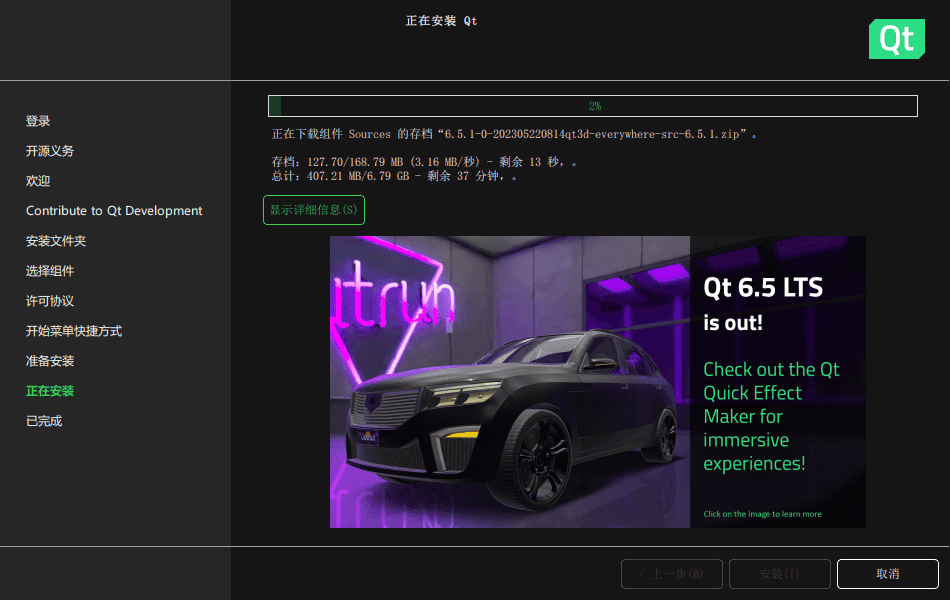
image.png

镜像列表

中国科学技术大学:http://mirrors.ustc.edu.cn/qtproject/
清华大学:https://mirrors.tuna.tsinghua.edu.cn/qt/
北京理工大学:http://mirrors.bit.edu.cn/qtproject/
阿里云:https://mirrors.aliyun.com/qt/
中国互联网络信息中心:https://mirrors.cnnic.cn/qt/

评论 0

还没有评论,来说点什么吧。

提交后需要审核才会公开。