引言
登录后可见
这段内容需要登录后才能查看。
除了一些方法,修改hosts来访问github也是一种方案,对此写了个小工具,便于访问github。
在此感谢hosts源提供者
- Licoy
- ineo6
- JohyC
本脚本引用了多个源,可选择性稍微多了点
可能遇到的问题
hosts提前把只读放开,不然可能导致写入错误。
脚本部分
import requests
import os

hosts_source = {
    "1": {
        "url": "https://hosts.gitcdn.top/hosts.txt",
        "fetch_time_key": "# last fetch time: "
    },
    "2": {
        "url": "https://gitlab.com/ineo6/hosts/-/raw/master/hosts",
        "fetch_time_key": "# Update at: "
    },
    "3": {
        "url": "https://raw.githubusercontent.com/JohyC/Hosts/main/hosts.txt",
        "fetch_time_key": "# Last update at"
    },
}
start_line = "# github_hosts_start_!!!"
end_line = "# github_hosts_end_!!!"
inner_update_time = '# update time :'
system_dir = os.environ.get("windir")

if __name__ == '__main__':
    print("=======================================================")
    print("os path", system_dir)
    print("hosts source")
    print("1:", hosts_source["1"]['url'])
    print("2:", hosts_source["2"]['url'])
    print("3:", hosts_source["3"]['url'])
    print("=======================================================")
    hosts_selector = input("[i]select hosts source[1,2,3]")
    hosts_url = hosts_source[hosts_selector]['url']
    fetch_time_key = hosts_source[hosts_selector]['fetch_time_key']

    print("[i] getting hosts text")
    get = requests.get(hosts_url)
    text = get.text.strip()
    text = start_line + "\n" + text + "\n" + end_line
    new_hosts_arr = text.split("\n")
    print("=======================================================")

    with open(os.path.join(system_dir, "system32/drivers/etc/hosts"), 'r', encoding='utf8') as f:
        read = f.read()
        split = read.split("\n")

        text = text.replace(fetch_time_key, inner_update_time)
        if read.find(start_line) != -1:
            hosts = read[0:read.find(start_line)] + read[read.find(end_line) + len(split[len(split) - 1]):]
            hosts = hosts.strip() + "\n"
        else:
            hosts = read.strip() + "\n"

        hosts += "\n" + text
        for i in split:
            if i.find(inner_update_time) > -1:
                print("[i] current_update_time=\033[1;31;20m", i.replace(inner_update_time, ""), "\033[0m")
        for j in new_hosts_arr:
            if j.find(fetch_time_key) > -1:
                print("[i] online_update_time=\033[1;32;20m", j.replace(fetch_time_key, ""), "\033[0m")

    s = input("[i]replace hosts?[y/Y/yes]")
    if s.lower() == 'y' or s.lower() == 'yes':
        try:
            with open(os.path.join(system_dir, "system32/drivers/etc/hosts"), 'w', encoding='utf8') as f:
                f.write(hosts)
                print("\033[1;32;20m[i] write hosts success\033[0m")
        except Exception as e:
            print("\033[1;31;20m[x] write hosts failure\033[0m")

        os.system("ipconfig /flushdns")
    print("=======================================================")
    print("[i] exit")
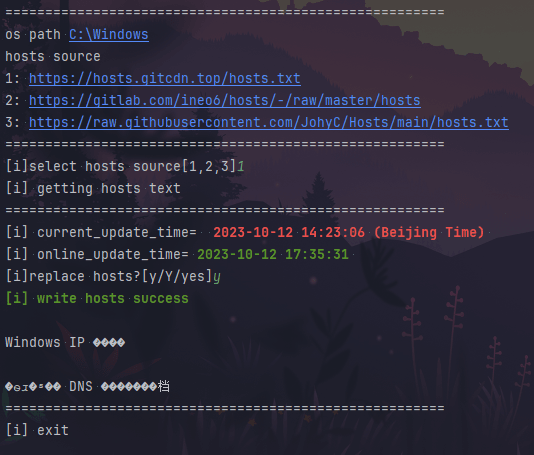
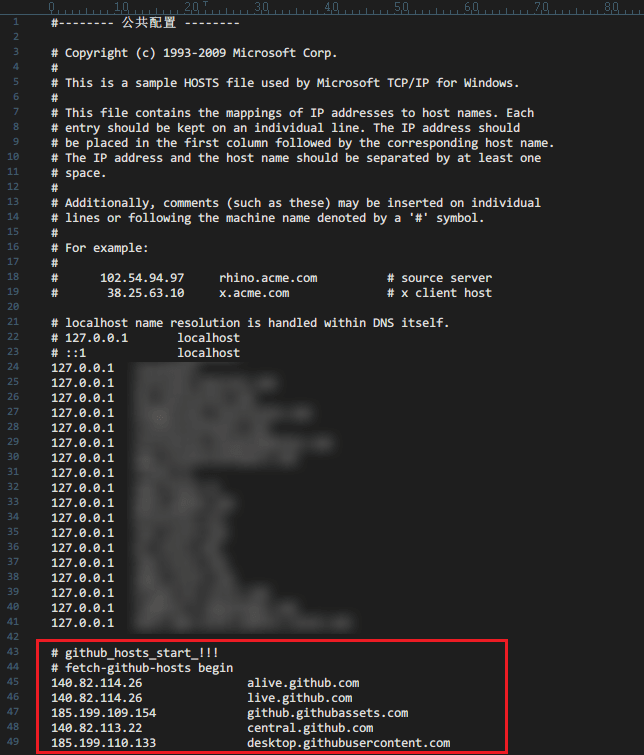
效果图
后续优化
可以添加启动参数,就不用手动输入了,然后添加一个定时任务,保持本地的hosts是最新的。
这里就不做开发了,提供个思路,剩下的交给小伙伴们来解决吧。


评论 1