引言
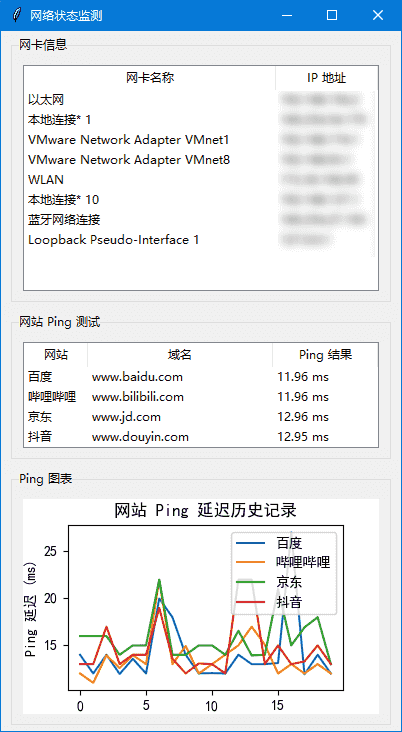
某次刷路由器和信号监测时候的一个产物,显示网卡IP信息,ping公网IP延迟图表。
起因是周末的时候无线网不稳定,想着刷一下路由器固件,这个路由器是当时上大学时候淘来的斐讯K2,可玩性确实挺强的,但是没有USB接口。emmm
话说回来,我的网络结构是连接客厅的WIFI,相当于中继器,并且自己组网,刷路由器因为不同固件他们的后台IP都不一样,有的是192.168.1.1,有的是192.168.199.1,这玩意儿在路由器还没有完全启动的时候是看不出来的,只能ipconfig刷,这么刷也挺累的(要是有watch命令就好了)。
接下来就是调整路由器位置,那块儿信号好,毕竟是中继,路由器固件也不太一样,信号强度不太好获取,那就另辟蹊径用ping来间接显示网络状况。所以就出了这个东西。
py代码
import tkinter as tk
from tkinter import ttk
import psutil
import threading
import time
from ping3 import ping
import matplotlib.pyplot as plt
from matplotlib.backends.backend_tkagg import FigureCanvasTkAgg
import matplotlib.font_manager as fm

# 目标网站
targets = {
    "百度": "www.baidu.com",
    "哔哩哔哩": "www.bilibili.com",
    "京东": "www.jd.com",
    "抖音": "www.douyin.com"
}

# 存储每个网站的 Ping 延迟历史记录
ping_history = {site: [] for site in targets}

# 获取所有网卡的 IP 地址
def get_network_info():
    info_list = []
    for interface, addrs in psutil.net_if_addrs().items():
        for addr in addrs:
            if addr.family == 2:  # IPv4
                info_list.append((interface, addr.address))
    return info_list

# 更新网卡 IP 信息
def update_network_info():
    while True:
        network_info = get_network_info()
        tree_network.delete(*tree_network.get_children())
        for item in network_info:
            tree_network.insert("", tk.END, values=item)
        time.sleep(1)  # 每 1 秒刷新一次

# 进行 ping 测试并更新 GUI
def ping_sites():
    timeout=1
    while True:
        for site, host in targets.items():
            delay = ping(host, timeout=timeout)
            result = f"{delay * 1000:.2f} ms" if delay else "超时"
            tree_ping.item(site, values=(site, host, result))
            if delay is not None:
                ping_history[site].append(delay * 1000)
            else:
                ping_history[site].append(timeout * 1000)
            # 只保留最近 20 个数据点
            ping_history[site] = ping_history[site][-20:]
            update_ping_chart()
        time.sleep(1)  # 每 1 秒刷新一次

# 设置支持中文的字体
font_path = fm.findfont(fm.FontProperties(family='SimHei'))
plt.rcParams['font.family'] = fm.FontProperties(fname=font_path).get_name()

# 更新 Ping 图表
def update_ping_chart():
    ax.clear()
    for site, history in ping_history.items():
        valid_data = [d for d in history if d is not None]
        if valid_data:
            ax.plot(valid_data, label=site)
    ax.legend()
    ax.set_xlabel('时间')
    ax.set_ylabel('Ping 延迟 (ms)')
    ax.set_title('网站 Ping 延迟历史记录')
    canvas.draw()

# 创建 GUI
root = tk.Tk()
root.title("网络状态监测")
root.geometry("400x700")

# 创建网卡信息区域
frame_network = ttk.LabelFrame(root, text="网卡信息", padding=10)
frame_network.pack(fill="both", padx=10, pady=5, expand=True)

tree_network = ttk.Treeview(frame_network, columns=("网卡", "IP 地址"), show="headings")
tree_network.heading("网卡", text="网卡名称")
tree_network.heading("IP 地址", text="IP 地址")
tree_network.pack(fill="both", expand=True)

# 创建 Ping 测试区域
frame_ping = ttk.LabelFrame(root, text="网站 Ping 测试", padding=10)
frame_ping.pack(fill="both", padx=10, pady=5, expand=True)

# 设置 Treeview 的 height 参数为 4,以适配 4 个网站的显示
tree_ping = ttk.Treeview(frame_ping, columns=("网站", "域名", "Ping 结果"), show="headings", height=4)
tree_ping.heading("网站", text="网站")
tree_ping.heading("域名", text="域名")
tree_ping.heading("Ping 结果", text="Ping 结果")
tree_ping.pack(fill="both", expand=True)

# 插入初始数据
for site, host in targets.items():
    tree_ping.insert("", "end", iid=site, values=(site, host, "测试中..."))

# 创建 Ping 图表区域
frame_chart = ttk.LabelFrame(root, text="Ping 图表", padding=10)
frame_chart.pack(fill="both", padx=10, pady=5, expand=True)

fig, ax = plt.subplots(figsize=(6, 4))
canvas = FigureCanvasTkAgg(fig, master=frame_chart)
canvas.get_tk_widget().pack(fill="both", expand=True)

# 启动线程更新数据
threading.Thread(target=update_network_info, daemon=True).start()
threading.Thread(target=ping_sites, daemon=True).start()

# 自动调整列宽
def auto_resize_columns(tree):
    for col in tree["columns"]:
        max_width = max([len(str(tree.set(item, col))) for item in tree.get_children()] + [len(col)]) * 10
        tree.column(col, width=max_width, stretch=True)

# 在 GUI 更新后调用
root.after(1000, lambda: auto_resize_columns(tree_network))
root.after(1000, lambda: auto_resize_columns(tree_ping))

# 运行 GUI
root.mainloop()
截图
结语
需要自取,水一篇文章,emm

评论 1